You can now give your fixed shipping prices to Norway, Sweden, Denmark and Finland in the
destination’s own currency instead of your store currency, for example SEK 79 or EUR 4.90.
If you sell in local currencies with Shopify Markets, Shopify converts shipping prices from your store
currency at the current exchange rate. A shipping price of NOK 79 can then show up as an uneven
amount such as SEK 82.37, and change with the exchange rate. When you give the price in the local
currency, Shopify doesn’t need to convert it, so your customers see the price you set.
In the checkout settings in Mybring, open the advanced shipping settings for Norway, Sweden,
Denmark or Finland and choose the local currency under Currency. The local currencies are:
- Norway: NOK
- Sweden: SEK
- Denmark: DKK
- Finland: EUR, with up to two decimals
The local currency applies to services with a fixed price and their discounts. Services with dynamic
prices, and their discounts, stay in your store currency, so Shopify still converts them. Discount
thresholds based on the cart total are also still given in your store currency.
NewShopify
You can now ask Sidekick, Shopify’s AI assistant, to book transport and get labels with Posten
Bring Checkout. You don’t need to open the order or the app first. Just tell Sidekick what you want, for
example:
- “Book transport for order #1234 with Posten Bring”
- “Get the shipping label for order #1234”
Sidekick never books on its own. When you ask it to book, it opens the booking dialog for the
orders you mentioned, so you can check the details before you click to book.
When you ask for labels, Sidekick replies with links to download them. Labels are only available
for orders where the transport has been booked.
NewShopify
You can now turn off the expected delivery in checkout for specific products, such as made-to-order
items, pre-orders or plants that ship in season. Before, the expected delivery was only hidden when a
product was out of stock.
Open the product, go to the Shipping tab and tick Hide expected delivery. For variable
products, you set it on each variation, and you can also set it for many products at once with bulk
edit. If any product in the cart has the setting ticked, checkout shows the shipping options without
an expected delivery.
The Posten Bring product settings, including the customs description (CN23), have also moved from the
General tab to the Shipping tab. For variations, they are now below weight and dimensions.
NewWooCommerceWooCommerce 1.1.72
Your customers can now return items themselves, straight from their order. They choose what to send
back, a single item or the whole order, and the plugin books the return with Posten, without you
having to make a label.
Posten emails the customer a Bring code and a QR code, so they can hand in the parcel at a parcel
locker or a pickup point, such as Post i butikk or a post office. Returns go back to where the order
was shipped from, or to another address in Norway if you prefer.
In Shopify, the customer requests the return in their customer account, and you approve it in
Shopify. Open Settings → Self-service returns in the app to see what to turn on. This requires
Shopify’s new customer accounts.
In WooCommerce, the customer starts the return from the order page or the Order completed
email. Open Posten Bring → Settings → Self-service returns to turn it on and choose whether
returns are approved automatically. You follow all returns under Posten Bring → Returns.
Self-service returns are available for orders shipped with Posten through the plugin, within Norway.
NewShopifyWooCommerceWooCommerce 1.1.69
Orders that need customs information, such as NVIT
shipments to Northern Norway and parcels sent abroad, are now clearly marked, and you add everything
customs needs in one place.
Customs information is required for NVIT shipments, and for shipments abroad from Norway with
Letter Packet (3639), or single-parcel shipments with PickUp Parcel (0340) or Business Parcel (0330).
For each product, you are only asked for what is missing:
- HS code: search for the right code, with data from Tolletaten.
- SKU: ideally the manufacturer’s or supplier’s product number.
- Customs description: a short description in English for the customs declaration (CN23), such
as “Wool sweater”. We suggest one based on the product information, so you only need to check it.
Everything is saved on the product and reused for later shipments.
You are responsible for the customs information being correct. Mistakes can delay the shipment in
customs.
ImprovementShopifyWooCommerceWooCommerce 1.1.68
From 1 November 2026, customs in the EU need to know more about each product you send from Norway to
private customers in the EU. We have made this easy for you: the plugin fills in these details from
your products automatically. All you need is a SKU on your products and the latest version of the
plugin.
What customs needs to know
For every product in a parcel from Norway to the EU, customs now asks for three things. This is
where we get them from, in both Shopify and WooCommerce:
- Your product number in the webshop. We use the product’s ID, which every product already has.
- The manufacturer’s product number. We use the product’s SKU.
- The barcode number, such as EAN, GTIN, UPC or ISBN. We use the barcode you have added to the
product. Not every product has one, and that’s fine: if it’s missing, we tell customs for you.
This applies when you send a PickUp Parcel or an international Letter Packet from Norway to an EU
country.
What you need to do
- Give every product you send to the EU a SKU. Ideally, use the manufacturer’s or supplier’s
product number, such as a model or article number. If you make the products yourself, your own
product number is fine. If a SKU is missing, we let you know before you book, so you can add it.
- Add the barcode to products that have one.
- Update the plugin before 1 November.
You are responsible for the details being correct.
NewWooCommerceShopify
You can now book transport directly on the order page in Shopify, without going through
More actions first. A new Posten Bring block shows the service your customer chose in checkout,
lets you change customer number or service, and books with one click.
Once the transport is booked, the block shows buttons for the label, the return label and tracking.
To add the block:
- Open any order in Shopify.
- Under Blocks, add Posten Bring.
- Pin the block so it shows on every order.
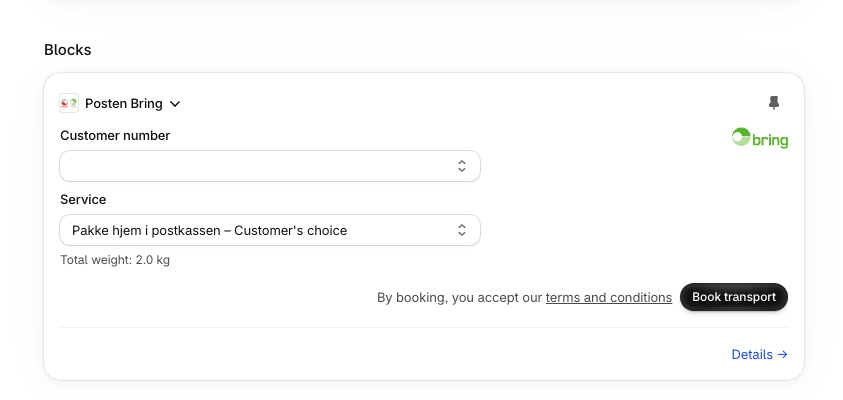
The block books the same way as bulk booking, with the total weight in one parcel. Orders that need
more, such as several parcels, customs information or a corrected address, get a link to the order
in the Posten Bring Checkout app, where you can finish the booking.
NewShopify
Are you shipping items with age restrictions (20+) like alcohol requiring age verification, or expensive items via
mailbox delivery that should never be left on the doorstep? Our plugins now have built-in support for configuring
your inventory products and product variants with:
- Requires age verification (20+)
- Should not be left on doorstep
When configured, the plugin will automatically ensure that only eligible shipping options are presented in the checkout,
and add the necessary value added services to the order to ensure the handling is done accordingly. The following value
added services are supported:
- 1082 Social control (requires separate Mybring agreement)
- 1280 Signature required (only compatible with Mailbox parcel in Norway)
NewShopifyWooCommerceWooCommerce 1.1.63
Webshops on a Shopify Plus plan can now enable our enhanced checkout experience. When enabled,
our shipping options are presented with:
- Logo and estimated arrival time
- Pickup point selector (instead of one shipping option per pickup point)
- Pickup point map (requires Google Maps API key)
- Delivery date selection for Pakke Hjem Pluss
- Environmental information, including Swan label where eligible
- Posten Fordeler points for domestic Norwegian B2C shipments
- Improved service descriptions
Go to Settings, and follow the activation instructions to enable it.
NewShopify
Labels can now be sent straight to your printer when you book transport, instead of being downloaded
and printed by hand.
Go to Settings → Automatic printing, create your own PrintNode
account, install the PrintNode client on a computer with access to the printer, and paste your
PrintNode API key. PrintNode is an external subscription service that you set up and pay for
yourself.
Then pick a printer for each active Shopify location. If you print everything on one roll, select
All products. If you use separate rolls, Home mailbox parcel labels can go to a printer with
100 x 100 mm labels and everything else to a printer with 102 x 192 mm labels. Bulk bookings are
combined into one print job per printer.
The transport booking completes even if printing fails, and the label is always available as a PDF
from the order.
NewShopifyWooCommerceWooCommerce 1.1.62
Every shipping option presented in checkout now includes the number of Posten Fordeler points the
customer earns by choosing it.
NewWooCommerceWooCommerce 1.1.61
When dynamic pricing is active, the total volume of the cart is now calculated from the product
dimensions you have configured. Volume is used in addition to weight, so the price presented in
checkout is as close as possible to what the shipment actually costs.
NewWooCommerceWooCommerce 1.1.60
NVIT (Norske varer i transitt) is now supported in both plugins. You are notified when an order
qualifies as NVIT and HS-code configuration is required. The plugin offers HS-code search with data
from Tolletaten, and stores the result as product attributes, so you are not asked to configure the
same product twice. It works for single orders and for bulk booking.
The WooCommerce release also adds an action hook,
posten_bring_checkout_pickup_point_selected, which gives you the details of the selected pickup
point when an order is created: id, name, address, postal code, city and country.
Groundwork shipped earlier in June, where shipments qualifying as NVIT started being enriched with
customs information from HS-codes configured as hscode, hs-code, htscode or hts-code product
attributes.
NewWooCommerceShopifyWooCommerce 1.1.54
Recipient phone numbers are now validated before a shipment is created, the same way booking already
did. Recipient email addresses got the same treatment three weeks earlier, on 19 May. Catching a bad
number or address at this point means fewer shipments that cannot be delivered or notified.
ImprovementWooCommerceShopify
Both plugins now support shipments to Finland, so Finnish delivery options appear in checkout for
webshops with Finland in their shipping zones.
NewWooCommerceShopifyWooCommerce 1.1.49
The Shopify plugin now understands the Homerunner format, so webshops using Homerunner get correct
delivery options and pickup points in checkout.
NewShopify
B2B shipping options in Shopify now work for shops with several locations and several B2B customers,
picking the right location and customer agreement per order.
ImprovementShopify
Business Parcel, Business groupage and Business pallet are now available as shipping options. The
plugins check whether the services are available for the order before presenting them.
NewWooCommerceShopifyWooCommerce 1.1.46
Posten Bring Checkout product meta data can now be bulk edited. If you have a lot of products that
are too large for, say, mailbox delivery, you can configure them all at once from the product bulk
edit page instead of one by one.
NewWooCommerceWooCommerce 1.1.43
Shipping rates are retrieved faster, which shortens the wait before delivery options appear in
checkout. The release also fixes the pickup point selector not being presented correctly for parcel
locker rates in shortcode based checkouts.
ImprovementWooCommerceWooCommerce 1.1.38
All shipping options presented through Dintero now include lead time. Requires Dintero v1.13.1 or
later.
ImprovementWooCommerceWooCommerce 1.1.37
The Parcel Locker service (0344) can be offered in checkout by both the WooCommerce and the Shopify
plugin, for shipments to Sweden and Denmark.
The service requires an agreement. Contact your sales representative if you want it in your
checkout.
NewWooCommerceShopify
With address autocomplete enabled, the plugin suggests Norwegian addresses in checkout. This makes
sure a valid address is captured when the order is placed, which means fewer failed deliveries.
The feature requires WooCommerce v10.3.0 or higher and has to be enabled under WooCommerce general
settings.
NewWooCommerceWooCommerce 1.1.36
If you use Dintero’s WooCommerce plugin (v1.11.0 or later) with shipping options in Checkout
Express, customers can now see and select Posten and Bring pickup points directly in checkout,
including expected arrival time. Posten and Bring shipping options are also shown with a logo.
NewWooCommerceWooCommerce 1.1.34
Both plugins can now show general announcements and operational messages from Posten Bring. We use
this to tell you about technical outages that affect your daily use of the plugin, and about other
important changes.
NewWooCommerceShopifyWooCommerce 1.1.32
Shortcode based checkouts and carts now show a free shipping indicator when no shipping costs apply
to the order.
ImprovementWooCommerceWooCommerce 1.1.28
You can now configure which return service your webshop uses, from the checkout settings in Mybring.
The plugins pick up the choice when return labels are generated.
NewWooCommerceShopify
Free shipping discount coupons are now taken into account when delivery options and prices are
presented in checkout.
NewWooCommerceWooCommerce 1.1.22
Shipping options in block based checkouts now include lead time details.
The release also warns you when static shipping is enabled in Vipps/MobilePay, since that stops the
plugin from showing the correct shipping options and pickup points.
ImprovementWooCommerceWooCommerce 1.1.21
From Vipps/MobilePay plugin v4.0.12, Posten Bring Checkout provides Vipps with shipping options,
pickup points, delivery dates, service descriptions and lead time. Shops using Vipps checkout get
the same delivery experience as in the standard WooCommerce checkout.
NewWooCommerceWooCommerce 1.1.19
Parcel lockers can now be offered as a service of their own, rather than being bundled with other
pickup options.
NewWooCommerceWooCommerce 1.1.9
Posten Bring Checkout is available from the
WordPress plugin directory, so it can be
installed and updated straight from your WordPress admin.
NewWooCommerceWooCommerce 1.1.1